Setting up regular investments is one of the most effective ways to build long-term wealth. PayTo makes this easier by letting you automate deposits directly from your bank account.
Below are answers to the most common questions.
- What is PayTo?
- Why should I use PayTo?
- How is this different from setting up a recurring transfer in my bank?
- Am I still in control of my money?
- Is PayTo safe?
- How do I set it up?
- Which banks support PayTo?
- What happens after I set it up?
- Can I change or stop it later?
- What if I don’t have enough money in my account?
- Do I have to use PayTo?
- Why is investing regularly important?
1. What is PayTo?
PayTo is a secure way to set up automatic payments directly from your bank account.
With Stockspot, it allows you to automate your deposits so you can invest regularly without needing to transfer money manually each time.
Compared to traditional direct debit, PayTo offers greater control, faster transfers and a more seamless setup experience.
2. Why should I use PayTo?
PayTo helps you stay consistent with your investing by removing the need to remember to transfer funds.
It’s designed to help you:
- Build a regular investing habit
- Save time and effort
- Stay invested through market ups and downs
- Grow your portfolio steadily over time
3. How is this different from setting up a recurring transfer in my bank?
If you’re already transferring money regularly, you’re on the right track.
PayTo simply makes it easier:
- Set up and manage everything within Stockspot
- No need to log into your bank to update or change transfers
- Adjust, pause, or stop anytime in one place
It’s a more seamless way to manage your investing plan.
4. Am I still in control of my money?
Yes.
You can:
- Change your deposit amount
- Update the frequency
- Pause or cancel anytime
You remain fully in control, PayTo just automates the process for you.
5. Is PayTo safe?
Yes. PayTo is supported by Australian banks and uses secure bank payment infrastructure.
You:
- Authorise the agreement through your bank
- Can view and manage the agreement within your Stockspot dashboard
- Don’t need to share your banking login details
6. How do I set it up?
Setting up PayTo is simple:
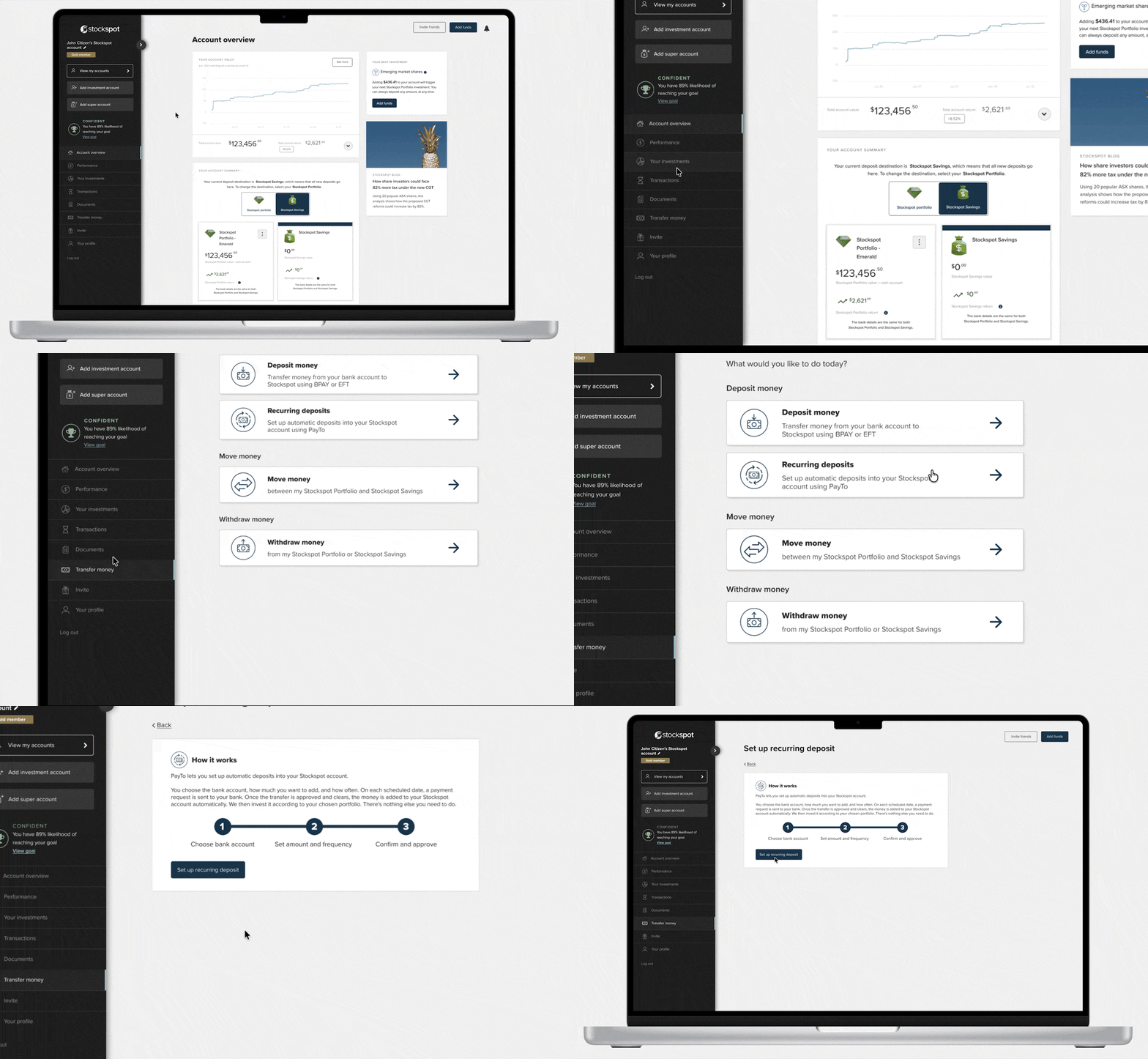
- Log into your Stockspot Dashboard > Transfer money > Recurring deposits
- Choose your deposit amount and frequency
- Enter your nominated bank account details
- Approve the PayTo agreement through your bank
The exact steps may vary slightly depending on your bank, but most setups take just a few minutes.
7. Which banks support PayTo?
Most major Australian banks support PayTo, though the approval process may look slightly different depending on your provider.
We provide step-by-step guidance to help you complete the setup with your bank.
See how it works here
Note: PayTo automatic deposits are currently available for individual and joint accounts only. We’ll continue working to support more account types over time.
8. What happens after I set it up?
Once your PayTo agreement is approved:
- We will send you an email to confirm your set up
- Your deposits will be automatically transferred based on your selected schedule
- Your funds will be invested into your portfolio as usual
You don’t need to take any further action.
9. Can I change or stop it later?
Yes.
You can update, pause, or cancel your automatic deposits at any time through your Stockspot dashboard.
10. What if I don’t have enough money in my account?
If there aren’t enough funds available, the payment may not go through. We’ll automatically try again the next day, and you’ll receive an email notification to keep you informed.
If needed, you can update your setup at any time:
- Adjust your deposit amount
- Change your schedule
- Pause your plan
We recommend choosing an amount that fits comfortably within your budget, or scheduling your deposit one to two days after your payday to help ensure funds are available.
11. Do I have to use PayTo?
No.
PayTo is optional – you can continue to top up your account using BPAY or normal bank transfer if you prefer.
However, many clients find that automating their deposits makes it easier to stay consistent over time.
12. Why is investing regularly important?
Investing regularly helps smooth out market ups and downs over time – a strategy known as dollar-cost averaging.
Instead of trying to time the market, you invest consistently, which can:
- Reduce the impact of short-term market movements
- Build discipline
- Support long-term growth
Got other questions? Get in touch with our friendly Client Care and Advice team.